
Remote teams don’t need more apps. They need communication that doesn’t fail when it matters.
The best phone systems for remote workers in 2026 are cloud-based VoIP platforms that deliver consistent call quality, secure access, and simple scalability. Solutions like RingCentral, Zoom, Nextiva, 8×8, and Dialpad lead because they actually work in real environments. Not just demos.
The Real Problem with Remote Communication
Remote work didn’t break communication. Bad systems did.
What we see over and over:
- Calls routed to the wrong person
- Employees using personal phones
- No visibility into missed opportunities
- Zero control over security
That’s not a tooling issue. That’s an operational risk.
At Uprite Services, we step into environments like this all the time. Businesses think they have a phone system. What they actually have is a patchwork of apps that fall apart under pressure.
This article is built for operators. People responsible for uptime, customer experience, and revenue.
What Is a Remote Phone System
A remote phone system is a cloud-based VoIP platform that allows employees to make and receive business calls from any location using internet-connected devices, while maintaining centralized control, routing, and security.
In practical terms:
- Your team can work from anywhere
- Calls follow the user, not the desk
- IT keeps full control over routing and access
- Everything runs through the cloud
VoIP transmits voice over broadband instead of traditional phone lines — which means your team isn’t tied to a desk, a building, or a single phone number. That flexibility is what makes it the standard for distributed teams.
What Makes a Phone System Actually Work for Remote Teams
This is where most buying decisions go wrong. People chase features. They ignore reliability.
Here’s what actually matters:
- Cloud-native architecture
- Consistent experience across desktop and mobile
- Intelligent call routing that doesn’t fail under load
- 99% uptime or better
- Built-in security controls
- CRM and support tool integrations
- Fast onboarding and scaling
According to Gartner (2024), cloud communications platforms have become the standard for distributed workforces due to scalability and lower infrastructure overhead.
Most platforms can check these boxes on paper. Very few deliver consistently in production.
Best Phone Systems for Remote Workers in 2026
These platforms have performed in real business environments. Here’s the breakdown.
RingCentral
Best for: Mid-market and growing companies
Where it works: Strong uptime, deep integrations, global scalability.
Where it struggles: Cost increases at scale, setup can get complex.
Zoom (Zoom Phone)
Best for: Teams already using Zoom
Where it works: Fast deployment, simple user experience.
Where it struggles: Limited advanced routing, not ideal for complex call flows.
Nextiva
Best for: SMBs that value support
Where it works: Stable performance, reliable customer service.
Where it struggles: Interface limitations, tiered pricing complexity.
8×8
Best for: Distributed and global teams
Where it works: International coverage, compliance features.
Where it struggles: Learning curve, UI inconsistencies.
Dialpad
Best for: Teams that want AI insights
Where it works: Real-time transcription, analytics and coaching.
Where it struggles: Overkill for smaller teams.
Traditional Phone Systems vs VoIP for Remote Work
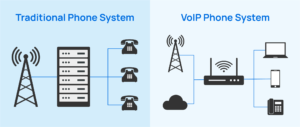
If your team isn’t sitting in one building, this isn’t even a debate.
| Feature | VoIP Systems | Traditional Systems |
| Setup | Fast, cloud-based | Hardware-heavy |
| Cost | $15–$50/user/month | High upfront + maintenance |
| Flexibility | Work from anywhere | Location-bound |
| Scalability | Instant | Slow, expensive |
| Maintenance | Provider-managed | IT-dependent |
According to Cisco (2023), businesses adopting cloud communications reduce infrastructure overhead and improve operational flexibility.
Traditional systems aren’t just outdated. They actively hold remote teams back.
How to Choose the Right Phone System Without Overthinking It
Most businesses overcomplicate this.
Here’s the framework we use:
- Start with risk, not features
- Define your uptime requirement
- Identify compliance needs
- Confirm integration requirements
- Test call quality before committing
If you’re choosing based on price, you’re already off track. The cheapest system is usually the most expensive once it starts failing.
Security Requirements Most Businesses Ignore
This is where things get dangerous.
Remote communication expands your attack surface. If your phone system isn’t secure, it becomes an entry point.
You need:
- End-to-end encryption
- Multi-factor authentication
- Role-based access controls
- Secure call recording storage
- Device-level security policies
The National Institute of Standards and Technology recommends strong identity and encryption controls for cloud systems to reduce risk in distributed environments (NIST, 2022).
Most providers offer these features. Few businesses configure them correctly.
Setup Checklist for Remote Phone Systems
- Choose the right provider
- Assign or port business numbers
- Configure call routing and auto-attendants
- Deploy apps across all devices
- Train your team
- Test call quality and failover
Skip any of these, and you’ll feel it later.
Cost Breakdown for Remote Phone Systems
Typical pricing:
- $15–$25/user/month for basic plans
- $25–$40/user/month for standard business use
- $50+/user/month for advanced features
What gets missed:
- Add-ons for analytics or integrations
- International calling costs
- Setup or onboarding fees
The platform cost is predictable. The operational impact isn’t — if you choose wrong.
Common Mistakes That Cost Businesses Time and Money
We see these constantly.
- Choosing based on price alone
- Ignoring call quality testing
- Skipping security configuration
- Buying features no one uses
- Not training employees
None of these show up during the demo. All of them show up in production.
FAQ
1. What is a remote phone system and how does it work?
A remote phone system is a cloud-based VoIP platform that lets employees make and receive business calls from any location using internet-connected devices. Calls pass through centrally controlled systems that manage routing, access, and visibility — no matter where your team works. No physical office equipment required.
2. Why are cloud-based VoIP systems better for distributed teams?
Cloud-based VoIP removes geographic limits, cuts hardware costs, and scales as the team grows. You get centralized management, improved uptime, and integrations with the tools your team already uses. That flexibility keeps communication consistent even when people are spread across multiple locations.
3. What should I prioritize when choosing a phone system for remote teams?
Focus on reliability, not feature lists. Start with 99.99% uptime, smart call routing, and strong security. Then look at CRM and support tool integrations. But only after you’ve confirmed the system holds up in real-world conditions — not just demos.
4. What does a remote phone system typically cost?
Most remote phone systems run $15–$50 per user per month depending on the plan. Basic plans cover core calling. Advanced tiers include integrations, analytics, and AI tools. Watch for hidden costs: international calling fees, add-ons, and onboarding charges.
5. How secure are remote phone systems?
When configured correctly, remote phone systems are highly secure. Core protections include end-to-end encryption, multi-factor authentication, role-based access, and secure data storage. But if they aren’t set up correctly, they become an entry point for cyber threats.
How Uprite Helps You Get This Right
Most businesses don’t need another vendor. They need clarity.
At Uprite, we help you:
- Evaluate the right platform based on your business risk
- Design call flows that match how your team actually works
- Configure security the right way from day one
- Deploy and support the system across your organization
- Monitor performance so issues don’t become outages
If your current setup feels fragile, it probably is.
Takeaway
This isn’t about picking a tool.
It’s about making sure your business can communicate when it matters most.
The right phone system should disappear into the background. Calls work. Routing works. Your team doesn’t think about it.
If they do, something’s wrong.